Superlight Tri-Mode Mouse: 26K DPI + Grip Tape
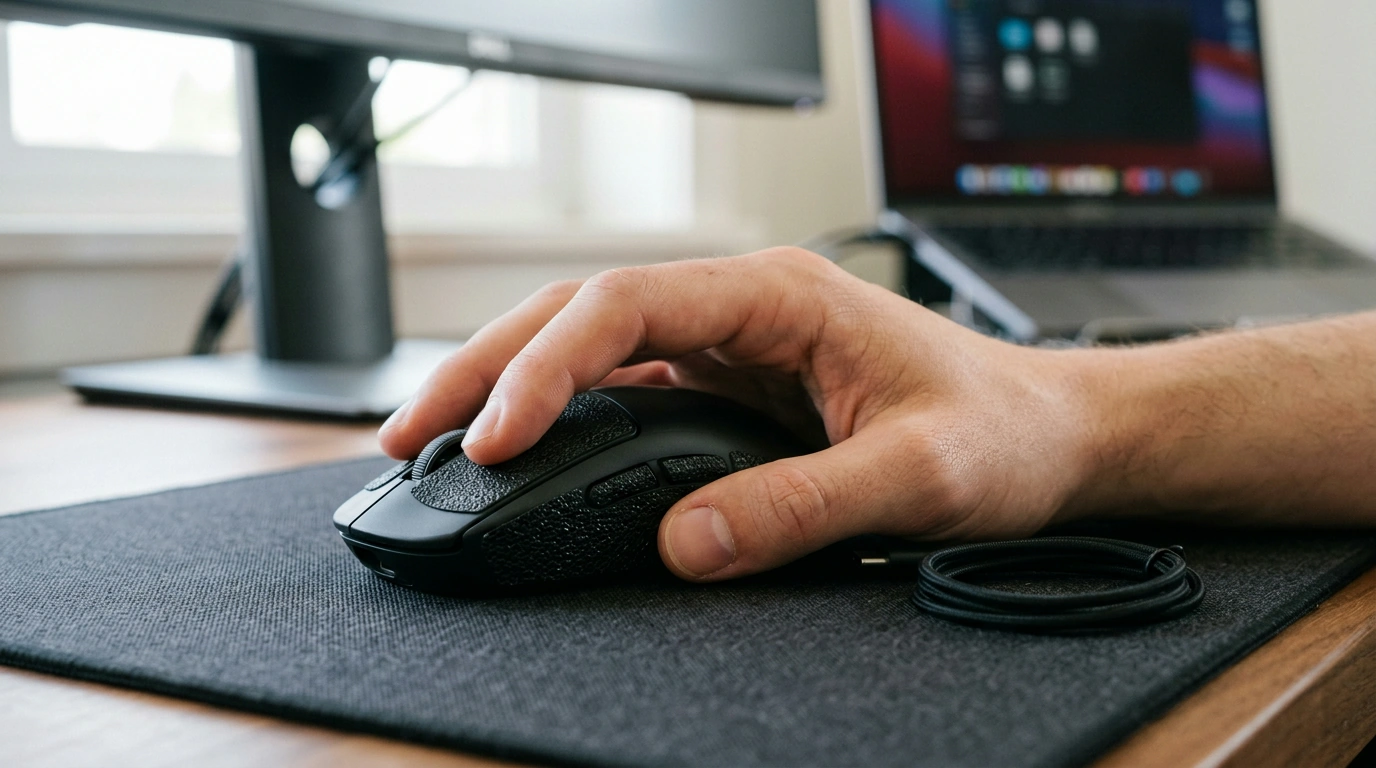
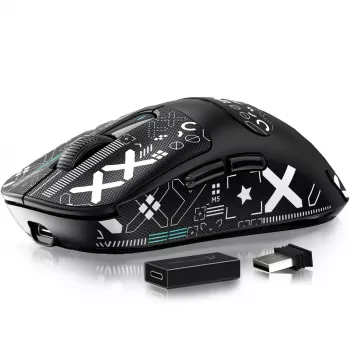
Superlight Tri-Mode Wireless Gaming Mouse with 26K DPI & Grip Tape
Speed and control should feel effortless—no cable drag, no hand fatigue, no guesswork. Our team built this superlight tri-mode wireless gaming mouse for clean aim, quick swaps between devices, and a secure hold when matches get tense. With up to 26K DPI on tap and included grip tape, it’s a straightforward upgrade for competitive play, hybrid work/gaming desks, and laptop setups that move room to room.
What this mouse is made for
- Fast, repeatable tracking for FPS, MOBA, and arena shooters where micro-adjustments matter
- Minimal desk friction and reduced wrist strain thanks to a lightweight build
- One mouse for multiple devices: gaming PC, work laptop, or a secondary setup
- A more locked-in feel without changing your grip style, using the included grip tape
If you want one mouse that can live on your main rig but also travel with your laptop, tri-mode connectivity does the heavy lifting—without forcing you into a “one setup only” routine.
Tri-mode connectivity: switch how you play (and where)
The core advantage of tri-mode is flexibility without extra friction. You can keep a high-performance connection ready for competitive sessions, then switch to a more convenient mode when you’re working or traveling.
- Use a low-latency 2.4G connection for competitive sessions where responsiveness is the priority
- Swap to Bluetooth for travel, meetings, or casual play—fewer ports and no dongle dependency when you’re mobile
- Plug in for wired play, charging, firmware/software adjustments, or when you prefer a consistent desk setup
- Keep a simple routine: dedicate one mode to each device (PC on 2.4G, laptop on Bluetooth) to avoid re-pairing hassles
| Mode | Best for | What to expect | Quick tip |
|---|---|---|---|
| 2.4G wireless | Ranked/competitive gaming | High responsiveness and stable performance | Use a front USB port or a dongle extender to reduce interference |
| Bluetooth | Work + travel, secondary device | Convenient pairing and broad compatibility | Disable unused Bluetooth devices nearby if connections feel crowded |
| Wired (USB) | Charging + uninterrupted sessions | No battery worries while playing | Route the cable so it doesn’t tug during wide swipes |
If you want a deeper look at Bluetooth standards and compatibility, the Bluetooth SIG maintains the official specification documentation at Bluetooth Core Specification. For USB behavior and best practices across ports and versions, see the USB-IF specifications library.
26K DPI control that stays predictable
A high maximum DPI gives you headroom, but the real win is consistency. Instead of chasing the biggest number, you’ll get better results by choosing a DPI that feels comfortable and sticking with it long enough for muscle memory to settle.
- A wide DPI range supports both low-sens arm aiming and higher-sens wrist aiming without feeling capped
- Dial in muscle memory by setting a primary DPI and avoiding constant switching mid-game
- Pair DPI with in-game sensitivity: small DPI changes can have big impact when your in-game sens is already low
- For consistency across titles, match your DPI first, then adjust each game’s sens to taste
If you like checking how DPI and in-game sensitivity relate between titles, you can reference baseline conversion concepts at Mouse Sensitivity Calculator (use it as a planning tool, then commit to one setting for a few days).
Superlight handling: faster starts, cleaner stops
Lightweight mice are popular for a reason: less mass typically makes rapid direction changes easier and reduces fatigue when you’re making constant micro-corrections. That matters whether you’re tracking a strafing target or resetting the mouse repeatedly on low sensitivity.
- A lighter mouse generally makes rapid direction changes feel easier, especially for tracking targets that strafe
- Less mass can reduce fatigue during long sessions and repeated lift-offs for low-sens players
- For maximum control, match mouse feet + mousepad to your style (speed pad for glide, control pad for stopping power)
- Consider lowering your grip pressure—lighter mice often perform best when the hand stays relaxed
Grip tape: secure hold without changing your favorite shape
Grip tape is one of the simplest ways to improve control under pressure. Instead of forcing a different grip style, you keep the shape you already like and add traction where it counts.
- Adds traction for sweaty hands or higher-tempo play where grip slips cause aim wobble
- Helps fingertip and claw grips feel more “locked” during micro-corrections
- Apply tape to the contact zones that matter most (thumb, ring/pinky side, main click area) instead of covering everything
- Keep it clean: wipe with a dry microfiber cloth to maintain texture over time
Setup tips for a clean, low-lag desk
Who it fits best (and how to choose your settings)
In-stock picks from our team
- Superlight Tri-Mode Wireless Gaming Mouse with 26K DPI & Grip Tape
- Lightweight 3L Cycling Backpack for Running, Hiking & Outdoor Sports (a compact carry option if you take your laptop and peripherals between rooms or on the go)
FAQ
What’s the practical difference between 2.4G wireless and Bluetooth for gaming?
2.4G (with a dongle) is typically the better pick for competitive play because it’s designed for low-latency, stable performance. Bluetooth is ideal when convenience matters more—like travel, meetings, or using a laptop without dedicating a USB port.
How should grip tape be applied for the best feel?
Place grip tape only on the zones where your fingers and thumb apply real pressure, and press it down firmly so the edges stay secure. Start minimal and adjust after a few sessions—too much tape can change the feel more than you intended.
Is 26K DPI necessary, and what DPI should be used?
26K DPI is mostly headroom; you don’t need to run anywhere near the maximum to play well. Most players get the most consistent results by choosing a fixed DPI (often 800–1600) and tuning in-game sensitivity around it.













Leave a comment