Pink Gradient Cherry Keycaps: 150-Key PBT+PC Guide
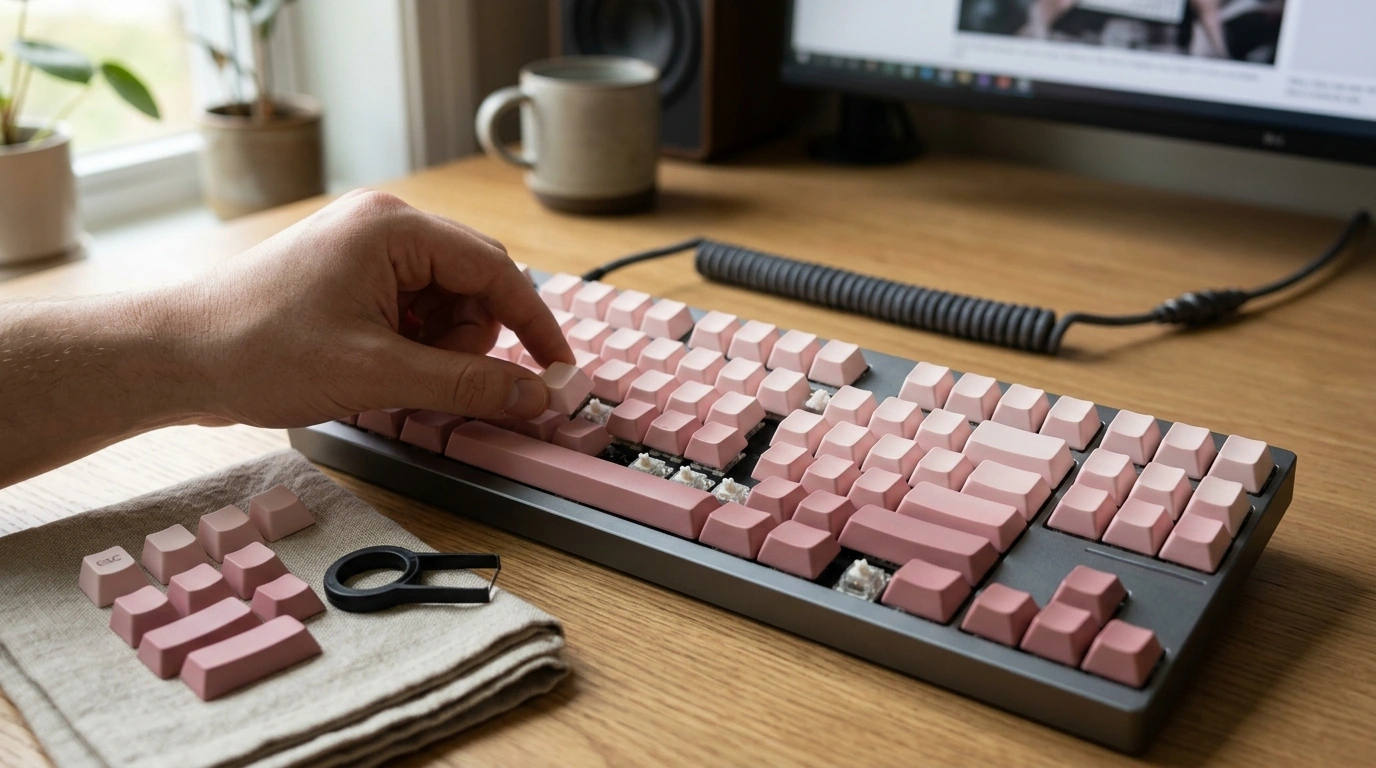
Cherry Profile Pink Gradient PBT+PC Keycap Set (150 Keys): A Clean Upgrade for Everyday Mechanical Keyboards
A keycap swap is one of the fastest ways to change how a keyboard looks and feels—without changing the board you already like. This Cherry profile pink gradient set pairs a soft color fade with a practical 150-key kit, built to cover many common layouts while keeping the familiar, low-sculpted Cherry typing shape. If you want your daily driver to feel refreshed (and look more intentional on your desk), this is a simple, high-impact place to start. For more guidance, see Keycap Set Rainbow Full-Spectrum Gradient … – FPSB.ORG.
What this set brings to a daily driver
- Cherry profile shaping for a familiar, efficient typing angle on many mechanical keyboards.
- A pink gradient that adds color without taking over your entire setup.
- 150 keys to support multiple layouts and rebuilds—handy if you rotate boards or experiment with configurations.
- PBT+PC material mix aimed at keeping surfaces and legends looking cleaner through regular use.
- An easy way to refresh an older keyboard, match a new desk theme, or build a giftable board.
If you’re ready to swap, our team carries the Cherry Profile Pink Gradient PBT+PC Keycap Set for Mechanical Keyboards – 150 Keys in stock.
Cherry profile, explained in practical terms
Cherry profile is sculpted by row, which means each row has a slightly different height and angle. In day-to-day use, that sculpting helps guide your fingertips back toward the home row, and it can feel more “locked in” during long writing sessions.
Compared with taller profiles, Cherry usually feels lower at the front row, which can reduce finger travel for many typists. If you’re coming from OEM caps, the transition is typically quick—similar overall idea, just a bit lower and more purposefully contoured.
For mixed use (emails, spreadsheets, then a quick game), Cherry profile tends to keep your hands in a consistent posture without the exaggerated height shifts that some taller sets introduce.
Material choice: what PBT + PC can do for feel and finish
PBT is a common choice for keycaps because it generally resists getting slick and shiny as quickly under heavy use. That matters most on the keys you hit constantly—spacebar, home row, and frequently used modifiers.
PC (polycarbonate) is often used when clarity or a different kind of light interaction is desired. In a gradient set, that can help the fade read smoother under room lighting and pair nicely with subtle backlighting without looking harsh.
In-hand, you can expect a firmer, more solid press than thinner caps. To keep the finish looking consistent, a quick wipe-down now and then goes a long way—especially if you use hand lotion or snack near your keyboard.
Layout coverage: how to confirm fit before installing
Before you pull a single key, confirm two things: your keyboard’s switch stem type and your physical layout. Most mechanical boards use an MX-style stem ecosystem (the cross-shaped mount), but layout is where people get surprised—especially on compact boards with non-standard bottom rows.
Common checkpoints before swapping keycaps (quick-fit guide)
| Keyboard area | What to check | Why it matters |
|---|---|---|
| Spacebar row | Spacebar size + nearby modifiers | Bottom-row sizes vary widely across boards |
| Left Shift | Standard vs shorter Shift | Compact layouts often use non-standard widths |
| Right Shift cluster | Arrow keys / 1u modifiers | 65%/75% layouts may shift keys around |
| Enter key | ANSI vs ISO shape | Different Enter shapes require different keycaps |
| Numpad / navigation | Presence of extra keys | Full-size and 1800-style boards add coverage needs |
A practical method our team uses: lay the new caps out on a towel in the same pattern as your keyboard. You’ll spot missing sizes immediately—before you’re halfway through an install.
Getting the most from the gradient look
Gradients look best when they feel “mapped” rather than random. Many setups look cleanest with lighter tones toward the top rows (so the board feels airy) and slightly deeper tones toward the bottom (to visually ground the keyboard).
If you’re building a full desk refresh around softer colors, you can also pair your keyboard upgrade with a small visual anchor like our Beige Travertine U-Shape Sculpture – Modern Stone Decor for Home Interiors to keep the setup feeling deliberate rather than overly themed.
Installation tips for a clean, safe swap
Care and upkeep: keeping the set looking fresh
If your keyboard travels with you between home and work, protecting it from grit helps your caps stay clean longer. For light carry needs, our Lightweight 3L Cycling Backpack for Running, Hiking & Outdoor Sports is a compact option that can handle essentials without bulk.
Who this set fits best
Helpful references (for deeper compatibility reading)
- Deskthority Wiki — Keycaps (profiles and general reference)
- Cherry — CHERRY MX overview (switch stem ecosystem background)
- WASD Keyboards — Mechanical keyboard keycap guide (layout and sizing concepts)
FAQ
Will this Cherry profile keycap set fit my mechanical keyboard?
It depends on your switch stem type and your layout. Confirm you have an MX-style stem, then double-check ANSI vs ISO Enter, your bottom-row modifier sizes, and Shift widths; the 150-key kit is designed to cover many common compact and full layouts.
What’s the main difference between Cherry profile and taller keycap profiles?
Cherry profile is lower and sculpted by row, which can reduce finger travel for many users while still guiding your fingers into place. If you’re coming from OEM, it usually feels like a quick, natural transition rather than a dramatic height change.
How do I clean PBT+PC keycaps without damaging the finish?
For routine cleaning, wipe with a microfiber cloth that’s lightly dampened with water. For deeper cleaning, wash removed caps with mild soap and lukewarm water, then let them air-dry completely before reinstalling, and avoid strong solvents or abrasive tools.













Leave a comment