Luxury Swivel Executive Chair: Ergonomic Recline + Footrest
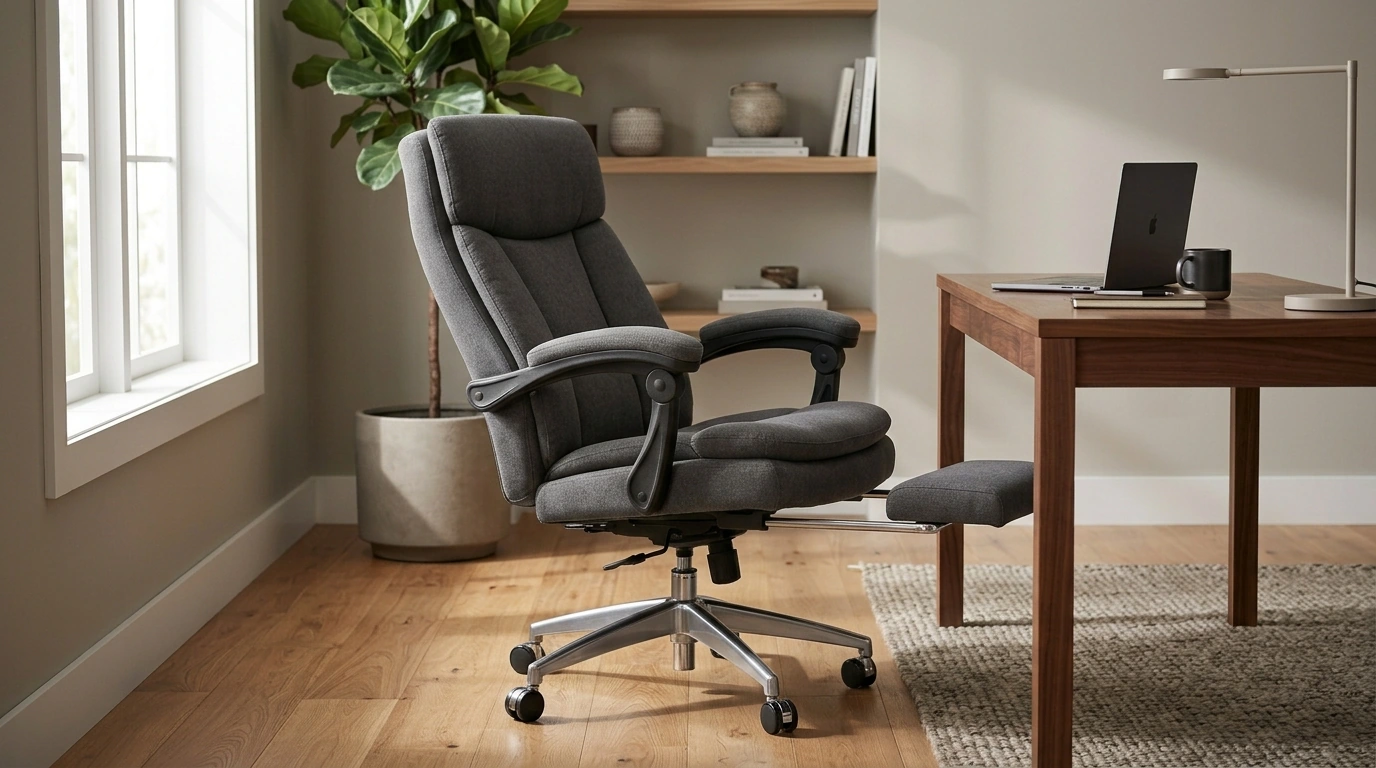
Luxury Swivel Executive Chair with Footrest and Ergonomic Design
A premium executive chair should feel supportive through long work sessions, adjust smoothly to different postures, and still look at home in a refined office. This luxury swivel executive chair pairs a reclining profile with an integrated footrest and ergonomic shaping to help reduce fatigue while keeping a polished, high-end presence.
What Sets This Executive Chair Apart
Comfort is only part of the equation for an executive workspace—smooth movement, posture versatility, and a confident silhouette matter just as much. This chair is built around the idea that the best seat is the one that lets you change positions naturally throughout the day.
- Swivel base supports easy transitions between desk tasks, calls, and meetings without awkward twisting.
- Recline-friendly design encourages posture variation rather than staying locked in one position for hours.
- Built-in footrest creates a more complete seated-rest posture for breaks and reset moments.
- Executive-style silhouette complements upscale home offices, studios, and leadership workspaces.
If you’re shopping specifically for a high-end upgrade, start with the Luxury Swivel Executive Chair with Footrest and Ergonomic Design and compare the fit details to your daily routine (typing-heavy work vs. call-heavy work vs. review/reading time).
Ergonomic Comfort Features to Look For
Ergonomic comfort isn’t about a chair feeling soft for five minutes—it’s about support staying consistent through long stretches, with pressure kept off sensitive areas. Guidance from sources like the OSHA Computer Workstations eTool and the Mayo Clinic office ergonomics guide consistently points back to neutral posture, steady back support, and workstation alignment.
- Seat support: balanced cushioning that feels plush yet doesn’t collapse over time.
- Back support: a contour that helps maintain the natural curve of the lower back during focused work.
- Arm support: armrests that allow shoulders to relax and elbows to stay close to a neutral angle.
- Head/neck support: a tall backrest that helps reduce neck strain during longer seated periods.
- Footrest positioning: a stable extension that supports lower legs without pressure points.
When these features work together, the chair feels “quietly supportive”—you notice less fidgeting, less leaning forward to find a comfortable spot, and fewer end-of-day pressure points.
Recline + Footrest: Building a Productive Rest Position
A recline function with an integrated footrest isn’t just for lounging—it’s a practical tool for breaking up static sitting. The goal is to rotate between an “active work posture” and a “recovery posture,” especially during long projects or meeting-heavy days.
- Use the recline for short recovery breaks to reduce static loading on the spine and hips.
- Extend the footrest to support circulation and reduce lower-leg tension during brief pauses.
- Keep the keyboard/mouse zone for upright work; shift to recline only when not actively typing.
- Alternate between upright work posture and reclined micro-breaks to stay comfortable longer.
A simple approach: work upright for focused typing, recline for two to five minutes to review documents or take a call, then return upright before the next task. This keeps the footrest from pulling you too far from the desk when precision mousing or fast typing is needed.
Fit and Adjustability Checklist
Even a luxury chair performs best when it matches your body proportions and desk setup. Use this checklist as a quick way to confirm you’re sitting “in” the chair rather than “on top” of it.
- Seat height: feet should rest flat on the floor during upright work; knees roughly level with hips.
- Seat depth: a small gap behind the knees helps avoid pressure on the back of the legs.
- Armrest height: forearms supported without lifting shoulders; wrists stay neutral while mousing/typing.
- Back contact: consistent support along the mid-to-lower back during your typical working posture.
- Swivel and stability: smooth rotation with a stable feel when shifting weight or reclining.
If something feels off, adjust one variable at a time (height first, then armrests, then recline tension). A small change can dramatically improve comfort over a full day.
Quick Specs and Buying Snapshot
For a fast comparison while planning your workspace, here’s a buying snapshot. It’s also worth measuring behind the chair for recline clearance and in front for footrest extension—especially in smaller home offices.
| Item | Details |
|---|---|
| Product | Luxury Swivel Executive Chair with Footrest and Ergonomic Design |
| Price | 2850.99 USD |
| Availability | In stock |
| Stock | 177 |
| Product page | View product |
- Best for: executive offices, home office upgrades, and long seated sessions with frequent posture changes.
- Notable comfort feature: integrated footrest paired with an ergonomic high-back profile.
- Buying note: confirm desk height and available space for reclining clearance before purchase.
Setup Tips for a Better Desk Fit
To complete a cohesive office, consider pairing your seating upgrade with subtle decor that complements an executive aesthetic, like the Beige Travertine U-Shape Sculpture – Modern Stone Decor for Home Interiors. For commuters or hybrid work, the Lightweight 3L Cycling Backpack for Running, Hiking & Outdoor Sports is a compact option for carrying essentials without a bulky profile.
FAQ
Is a footrest useful on an executive office chair?
Yes—during short breaks, a footrest can support your lower legs, reduce tension, and help circulation. It’s most useful for brief recovery moments between tasks rather than while actively typing at the desk edge.
How should an ergonomic executive chair feel when properly adjusted?
Your feet should be flat on the floor, knees near hip level, shoulders relaxed, and elbows close to a neutral angle. You should feel steady lower-back support with no sharp pressure behind the knees.
How much space is needed for reclining and using the footrest?
Plan for clearance behind the chair for the recline range and in front for the footrest extension. Measuring your workspace before buying helps avoid cramped movement and ensures the chair can fully function.










Leave a comment