1080P WiFi Security Cam: Color Night Vision + Pan/Tilt
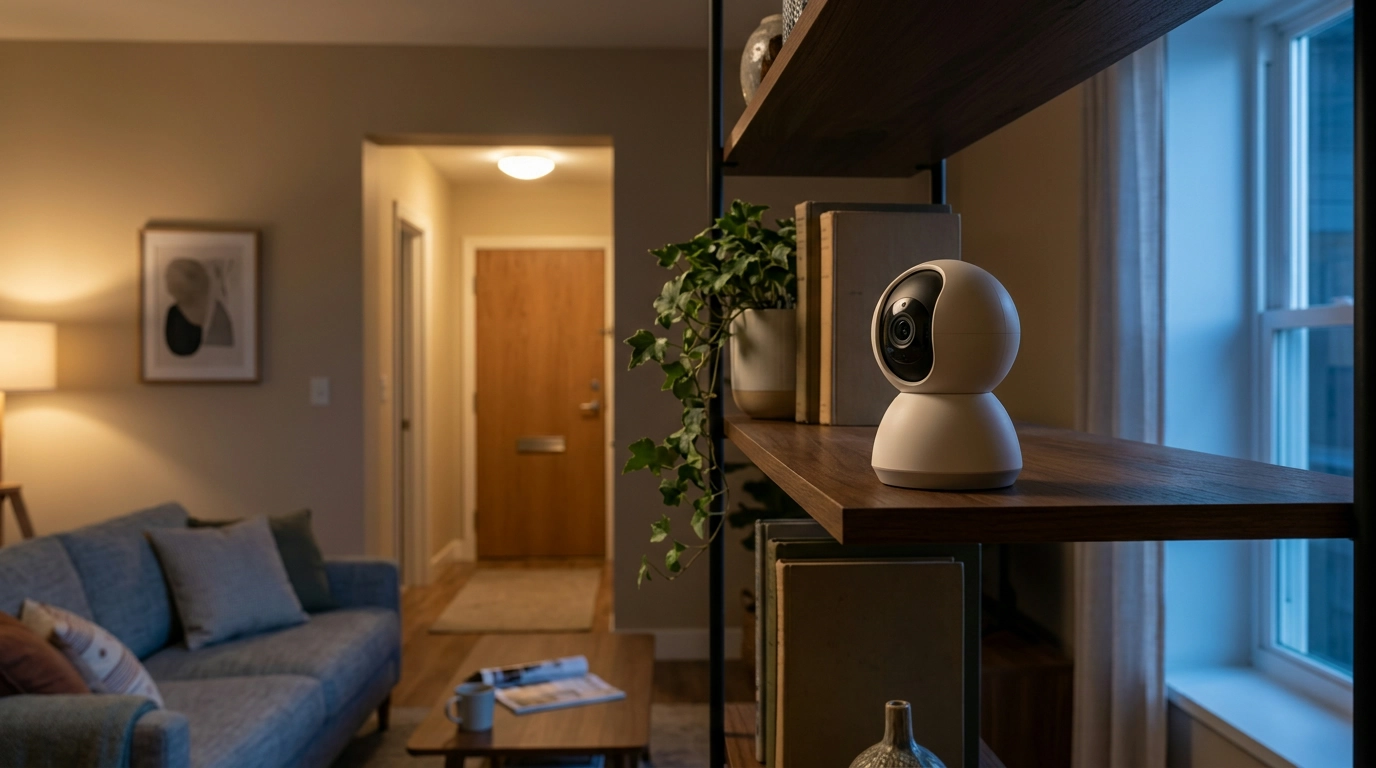
1080P WiFi Security Camera with Color Night Vision & 360° Pan/Tilt
Home security works best when it blends into everyday life: clear video when it matters, wide coverage without constant repositioning, and visibility after dark without turning the room into a spotlight. Our 1080P WiFi security camera is built for that kind of practical protection—combining color night vision with 360° pan/tilt coverage to help you keep an eye on entries, shared spaces, pets, and more.
What this camera is designed to solve
Most indoor security gaps come down to a few repeat problems. Our team sees this model as a strong fit when you want broad coverage without overcomplicating your setup.
- Blind spots: 360° pan/tilt coverage helps reduce the need for multiple fixed-angle cameras in a single room.
- Nighttime clarity: Color night vision is intended to keep details visible after dark, not just silhouettes.
- Everyday monitoring: A balanced setup for checking in on a home office, living room, nursery area, or hallway without complicated wiring.
- Simple placement: A WiFi-connected camera suits renters and homeowners who want security without drilling through exterior walls.
Quick fit guide: where pan/tilt + color night vision helps most
| Area | What to watch for | Recommended placement idea | Why pan/tilt helps |
|---|---|---|---|
| Front entry (indoor view) | Door opens, packages, guests | High corner facing door | Sweep between door and walkway-side windows |
| Living room | After-hours movement, valuables | Corner with view of main paths | Follow activity across the room without losing framing |
| Hallway | Traffic between rooms at night | End of hall aiming down corridor | Rotate to cover branching doorways |
| Home office | Equipment, deliveries at the door | Facing desk + entry line | Reframe between workspace and doorway |
| Pet area | Crates, feeding stations, nighttime activity | Wall shelf or stable surface | Track movement across the floor area |
Core features that matter day to night
- 1080P video: Full HD resolution supports clearer faces, labels, and object details than lower-resolution cameras—especially when you need to zoom into playback.
- Color night vision: Designed to preserve color information in low light for more useful nighttime clips.
- 360° pan/tilt coverage: One camera can cover multiple angles of a room, reducing the need to reposition the camera manually.
- WiFi connectivity: Enables remote viewing and notifications through a compatible app experience (results depend on device and network setup).
- Everyday-friendly monitoring: A practical option for check-ins while you’re at work, traveling, or simply in another room.
Setting it up for reliable coverage
Placement usually matters more than people expect. A few small choices can make clips clearer and alerts more meaningful.
- Start with the camera’s job: Pick a primary target (entry door, hallway junction, or main room pathway) before you fine-tune the angle.
- Use height to your advantage: Positioning higher typically improves room coverage and reduces easy tampering.
- Avoid glare sources at night: Keep the lens away from mirrors, glossy TV screens, and windows facing streetlights that can reduce low-light clarity.
- Stabilize the WiFi signal: Place the camera within strong router range; if signal is weak, a mesh node or extender can improve consistency.
- Create a naming system: Name the camera by location (example: “Hallway North”) so alerts and clips immediately make sense.
Placement checklist for cleaner clips
| Do this | Why it helps |
|---|---|
| Aim slightly downward from a high corner | Captures faces and movement paths while reducing ceiling glare |
| Keep the camera out of direct sunlight | Reduces washout and improves exposure balance |
| Avoid pointing straight at a window at night | Prevents reflections and low-light flare |
| Cover the room’s “decision points” | Records where people pause: doors, drawers, safes, stair landings |
Using pan/tilt the smart way (so you don’t miss moments)
Pan/tilt is most helpful when it’s structured. Random spinning can leave you aimed at the wrong spot at the wrong time.
- Set a default view: Choose a “home position” that covers your most important area so the camera returns to a useful angle.
- Build a scan routine: Rotate between two or three key zones (doorway, hallway, valuables) rather than sweeping continuously.
- Reduce accidental motion triggers: Place the camera away from constantly moving fans, curtains, or busy TV screens that can create unnecessary alerts on many systems.
- Think in zones: Each angle should have a purpose—entry control, interior pathway, or a protected corner.
Practical privacy and security habits for WiFi cameras
Your camera is only as secure as the network and account behind it. A few habits go a long way, and the guidance from organizations like CISA, NIST, and the FTC aligns with the same basics:
Shop our in-stock picks
- 1080P WiFi Security Camera with Color Night Vision & 360° Pan/Tilt ($34.01)
- Lightweight 3L Cycling Backpack for Running, Hiking & Outdoor Sports ($38.67)
- Beige Travertine U-Shape Sculpture – Modern Stone Decor for Home Interiors ($100.01)
Who this camera is a strong match for
FAQ
Does the camera work if WiFi goes out?
If WiFi drops, functions like remote live viewing, phone notifications, and viewing while away from home typically stop until your network returns. Some cameras can continue limited on-device recording depending on how storage is supported and configured.
Is it compatible with 2.4GHz or 5GHz WiFi?
Many smart cameras commonly use 2.4GHz WiFi for better range and wall penetration, while some models also support 5GHz. Match your setup to the WiFi band(s) the camera supports so you get a stable connection where you plan to mount it.
How should the camera be positioned for the best color night vision?
Mount it high (often a corner works best), aim slightly downward toward the area you care about, and avoid pointing at reflective surfaces like windows, mirrors, or glossy screens. Keeping the lens away from direct glare helps preserve detail and color in low-light scenes.














Leave a comment