100W Magnetic USB-C Cable: Fast Charging for iPhone 15
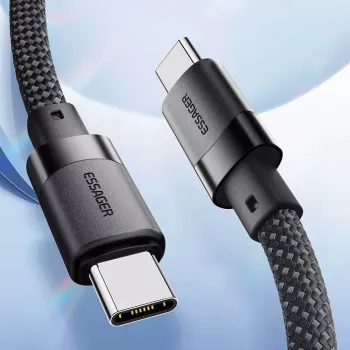
100W USB‑C to USB‑C Fast Charging Magnetic Cable for iPhone 15, Laptop & More
A good USB‑C cable should do three things consistently: charge fast, stay connected, and keep daily carry simple. Our 100W USB‑C to USB‑C magnetic cable is built for modern devices that rely on USB‑C—like iPhone 15 series, tablets, handhelds, and USB‑C laptops—while adding a magnetic design that helps keep your desk, nightstand, or travel kit neat. Pair it with the right USB‑C Power Delivery (PD) charger and it becomes an easy “one cable” option for charging across devices without constantly re‑routing or tangling cords.
What this magnetic USB‑C cable is made to solve
- One cable for USB‑C devices: You can use it across USB‑C phones, tablets, and many laptops that charge over USB‑C.
- Faster charging headroom: It’s designed for up to 100W when you use a compatible USB‑C PD charger and a device that can accept that power level.
- Cleaner setups: The magnetic styling helps you manage slack and keep the cable controlled on a desk, nightstand, or in a bag.
- Less daily friction: It’s easier to grab, route, and store—especially if you rotate between devices throughout the day.
Understanding “100W” in everyday charging
“Up to 100W” is best read as capacity, not a promise that every device will charge at 100W. Your charger and your device negotiate the power level, and the device ultimately decides what it will draw.
- Charger + device determine speed: The cable can carry high power, but a low-watt wall adapter (or a non‑PD charger) can still make charging feel slow.
- Power Delivery matters: If you want higher-watt charging over USB‑C, you typically want a USB‑C PD charger rated for your target (20W/30W for phones, 45W/65W for many laptops, up to 100W for higher-power needs).
- Phones don’t “take” 100W: iPhone 15 models and most phones charge well below 100W; the real benefit is compatibility and stability with plenty of overhead.
- Common “slow charge” culprits: Underpowered adapter, non‑PD adapter, a device that limits input, or a USB‑C port that needs cleaning.
Quick pairing guide (device + charger + expected behavior)
| Device type | Suggested PD charger | What to expect | Good to know |
|---|---|---|---|
| iPhone 15 / USB‑C phone | 20W–30W PD | Fast charging within the phone’s supported range | The phone controls the max wattage; the cable provides reliable delivery |
| iPad / USB‑C tablet | 30W–45W PD | Faster top‑ups and steadier charging while in use | Higher watt chargers can help tablets maintain charge under load |
| Ultrabook / USB‑C laptop | 45W–65W PD | Everyday charging for light to moderate workloads | Some laptops need more power to charge while gaming or rendering |
| Higher‑power laptops | 65W–100W PD | Best chance at charging during heavier tasks | Device still decides final draw; check your laptop’s recommended wattage |
Where the magnetic design helps most
- Desk cable routing: The cable stays more “where you left it,” cutting down on cord sprawl across your workspace.
- Nightstand charging: It helps prevent the cable from slipping behind the bed or dresser, so you’re not fishing for the end at night.
- Travel organization: Packing is cleaner because the cable is easier to keep coiled and less likely to tangle with everything else in your bag.
- Shared charging spots: If multiple people use the same charging area, a more controlled cable tends to survive the daily shuffle better.
How to get the best performance (fast, safe, consistent)
- Use a reputable USB‑C PD charger: PD is what unlocks higher‑power charging over USB‑C; non‑PD adapters often fall back to slower rates.
- Match wattage to your device: A 100W‑capable cable is most noticeable when you’re charging a laptop or power-hungry tablet that benefits from 45W–100W input.
- Keep ports clean: A small amount of lint in a USB‑C port can cause intermittent charging, disconnects, or reduced power delivery.
- Reduce strain at the connector: Avoid sharp bends at either end, especially when a laptop is on a couch or bed—steady routing improves long-term reliability.
- If data transfer matters, confirm your needs: Many high‑power charging cables prioritize power delivery; if you frequently move large files, a dedicated high‑speed data cable can be a better match.
Who this cable is best for
Product picks from our team
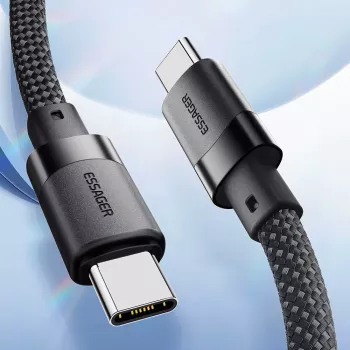
- 100W USB‑C to USB‑C Fast Charging Magnetic Cable for iPhone 15, Laptop & More — A practical daily driver when you want higher-watt headroom and tidier cable management.
- Lightweight 3L Cycling Backpack for Running, Hiking & Outdoor Sports — A compact carry option when you want a small pack for essentials like your charger, cable, and phone while commuting or traveling light.
Helpful references (for charging standards)
- USB Implementers Forum (USB‑IF) — USB Power Delivery
- Apple Support — About USB‑C on iPhone
FAQ
Will this charge an iPhone 15 faster than a regular USB‑C cable?
Charging speed depends on your USB‑C PD charger and what your iPhone 15 supports. This cable supports fast charging when paired with a compatible PD adapter, but your phone still controls the maximum rate it will accept.
Do 100W cables require a 100W charger to work?
No—this cable works with lower‑watt USB‑C PD chargers as well. The 100W rating simply gives you more headroom for higher‑power devices and chargers.
Can one cable charge both a laptop and a phone safely?
Yes, when you use a quality USB‑C PD charger and a properly rated cable, power is negotiated automatically. Each device requests only what it needs, so charging remains appropriate for both a phone and a laptop.













Leave a comment