Cloud-Shaped Memory Foam Wrist Rest for Your Desk
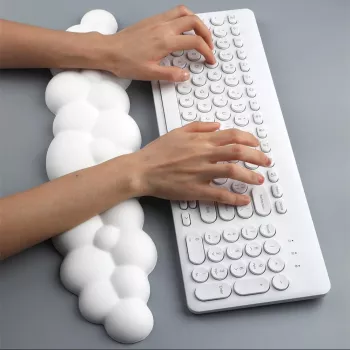
A comfortable desk setup can be practical without feeling all business. Our cloud-shaped ergonomic keyboard wrist rest pad adds a playful touch to your workspace, with memory foam cushioning that gives your palms a softer place to pause. Listed at $6.97, it’s a small addition to consider when you want to refresh the area in front of your keyboard.
A Little Cloud for Your Keyboard
The defining details are simple: a cloud shape and memory foam cushioning. Together, they make this wrist rest an appealing option if you want a cushioned resting surface that also brings a little personality to your desk.
A keyboard, monitor, and other essentials often take up most of the visual attention in a workspace. A cloud-shaped accessory offers a change from strictly utilitarian desk gear while still serving a practical purpose. You can enjoy the softer look without needing to overhaul your entire setup.
Comfort is personal, though, and a wrist rest is not a promise of pain relief. The way you position your keyboard, chair, and arms matters too. We suggest treating the pad as one part of your workspace rather than expecting it to make every desk arrangement comfortable on its own.
How to Use a Wrist Rest at Your Desk
Start by placing the pad in front of your keyboard. Leave enough room to reach the keys comfortably, and adjust the pad’s position so it doesn’t force your hands into an awkward angle. Your keyboard should be close enough that you can type without stretching forward.
While typing, aim to keep your wrists as straight and neutral as practical. Use the pad to rest your palms during pauses rather than pressing your wrists into it as you type. The OSHA guide to wrist and palm supports offers more information on positioning these accessories.
It also helps to look beyond your hands. Set your keyboard and chair so your shoulders can relax and your elbows stay comfortably near your body. If you find yourself reaching upward, hunching, or leaning toward the keys, adjust your setup rather than relying on the pad to compensate.
Give yourself regular breaks from typing, too. A brief pause gives you a chance to change position, relax your hands, and return to your work without staying fixed in one posture for too long.
Choosing a Comfortable Setup
Before adding a wrist rest, consider the space between your keyboard and the front edge of your desk. You’ll want room for both the pad and your keyboard without crowding the area where you work. Compare the product dimensions, when available on the product page, with your keyboard and desk space.
Think about how you use your desk throughout the day. If you move your keyboard aside to write or use another device, a separate pad gives you another item to position when you switch tasks. Make sure your arrangement still leaves your everyday tools within comfortable reach.
Desk Setup Checklist
| Consideration | What to look for |
|---|---|
| Keyboard position | Place it where you can reach the keys without stretching. |
| Wrist alignment | Aim for a straight, neutral wrist position while typing. |
| Resting surface | Position the pad so the palms can rest comfortably during pauses. |
| Desk space | Allow room for the pad and keyboard without crowding the work area. |
Once you have your essentials in place, leave room for the details that make the workspace feel like yours. If you prefer a more decorative accent elsewhere on your desk or a nearby shelf, our beige travertine U-shape sculpture is another option to explore. Keep decorative pieces clear of the area you need for comfortable typing and movement.
A Simple Addition to Your Workspace
Our cloud-shaped pad combines a lighthearted look with memory foam cushioning for a softer place to rest your palms between typing sessions. It’s an easy detail to consider alongside the bigger decisions that shape your comfort, from keyboard placement to taking regular breaks.
Explore the cloud-shaped ergonomic keyboard wrist rest pad with memory foam for current availability and purchase details. The listed price is $6.97; check the product page for any specifications you need before ordering.
Before choosing, compare the product details with your daily routine, available space, care needs, and preferred setup. The strongest option is usually the one that fits the intended use clearly and remains simple to clean, store, and check before repeat use.
It is also worth checking measurements, material notes, included parts, and compatibility details so the item matches the way it will be used after delivery.
Before choosing, compare the product details with your daily routine, available space, care needs, and preferred setup. The strongest option is usually the one that fits the intended use clearly and remains simple to clean, store, and check before repeat use.
FAQ
Should I rest my wrists on the pad while typing?
Keep your wrists as straight and neutral as practical while typing. Rest your palms on the pad during pauses rather than pressing your wrists into it.
What is the cloud-shaped wrist rest made with?
The cloud-shaped wrist rest contains memory foam cushioning.
Will this wrist rest fit my keyboard?
Check the product page for dimensions and compare them with your keyboard and available desk space before buying.















Leave a comment