Bluetooth Speaker Charging Dock: Easy Power, Less Clutter
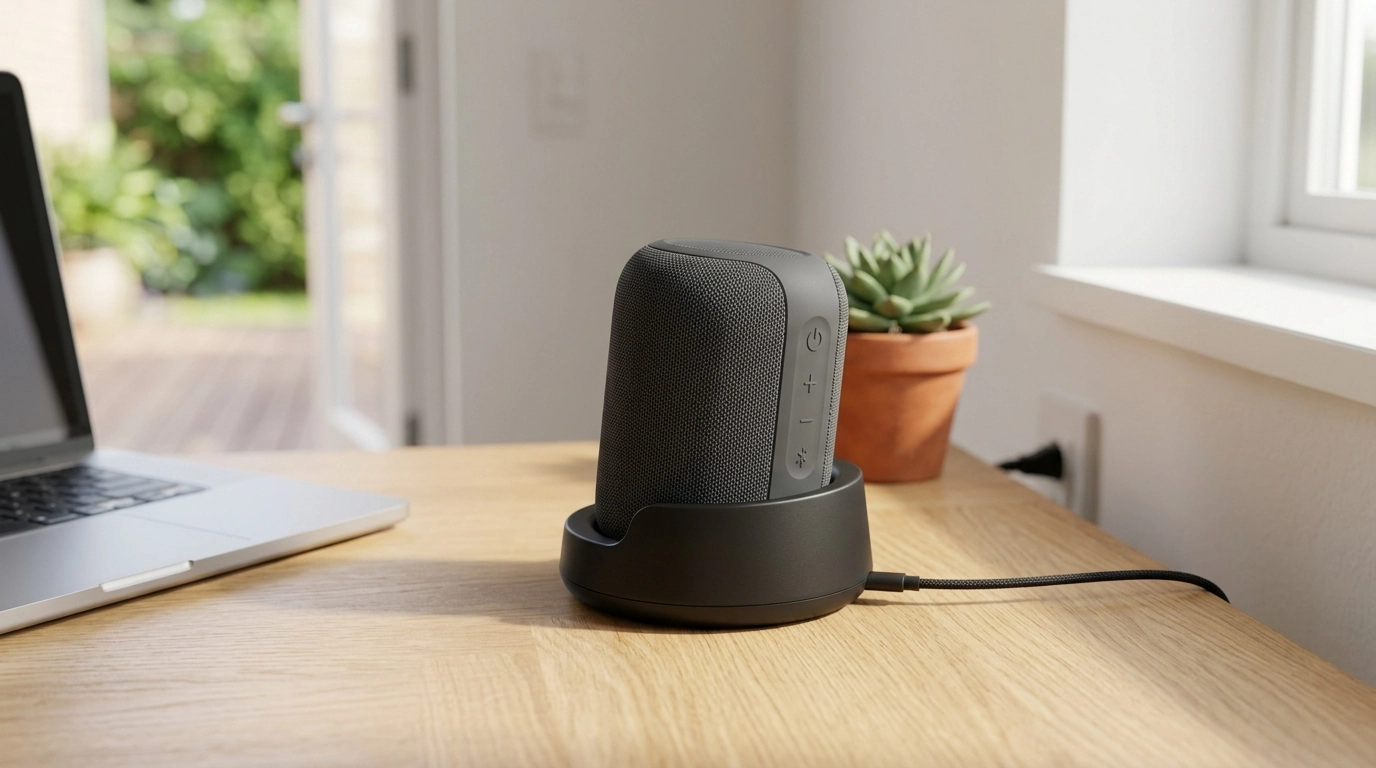
Power Charging Dock for Bluetooth Speaker: A Cleaner Way to Charge and Keep Music Ready
A Bluetooth speaker is easiest to use when charging is effortless—no hunting for cables, no balancing the speaker on a crowded surface, no half-plugged connectors. A dedicated power charging dock keeps the speaker stationed, powered, and ready to grab for the patio, kitchen, desk, or travel bag. Our team put together this guide to walk you through what a charging dock helps with, where it fits best, and the quick checks that make sure it matches how you actually use your speaker day to day.
What a charging dock adds to a Bluetooth speaker setup
- A consistent home base: You get one spot where the speaker returns after use, so it stays charged more often without extra effort.
- Less connector wear: Docking can reduce repeated plugging and unplugging stress on the speaker’s charging port when you top up frequently.
- Tidier surfaces: A dock can keep the cable routed and reduce loose cords on a nightstand, kitchen counter, or workstation.
- Faster “grab-and-go”: When the speaker lives on the dock, it’s easier to pick up and head outside without checking battery first.
Where this dock makes the most sense at home and at work
- Bedroom/nightstand: Keep your speaker charged for morning routines, timers, white noise, or audiobooks without cluttering the surface.
- Kitchen counter: A stable charging spot reduces cable drape near sinks and keeps music going while you cook.
- Home office or desk: A dedicated station helps you avoid low-battery interruptions during calls, focus playlists, or background audio.
- Workshop/garage: Docking the speaker between sessions keeps it ready without leaving it on a toolbench edge where it can get bumped.
- Shared spaces: In a family room or common area, a dock makes it obvious where the speaker belongs, so it’s easier to find.
Fit check: what to confirm before choosing a charging dock
The main “gotchas” with charging docks aren’t about sound—they’re about power delivery and physical alignment. Before you commit to a dock, confirm these basics so docking feels effortless instead of fiddly.
- Charging method: Confirm whether your speaker charges through a standard port (commonly USB) or uses proprietary contact-based dock charging.
- Connector orientation: The port direction matters. The right dock layout should let the connector sit naturally, without bending the plug or torquing the port.
- Stability: If your speaker is tall, top-heavy, or lives where it gets bumped, prioritize a dock shape that supports the base securely.
- Case/skin compatibility: If you keep a protective cover on your speaker, make sure it can still seat properly without forcing the fit.
- Power source placement: Plan how the dock cable reaches an outlet or power strip without creating a snag or trip hazard.
- Daily routine: If you move the speaker often, you’ll appreciate a dock you can use one-handed—set down, click in, walk away.
Quick compatibility checklist
| Check | Why it matters | What to look for |
|---|---|---|
| Speaker charging port type | Determines whether a dock can power the speaker reliably | Speaker manual/specs; confirm USB charging vs proprietary dock contacts |
| Port location & angle | Avoids strain on the connector | A seated position that doesn’t twist or bend the plug |
| Speaker base size | Prevents wobble and accidental drops | A dock footprint that supports the speaker’s base |
| Cable reach | Avoids awkward placement near outlets | Enough cable length or easy routing to a power strip |
| Use frequency | Impacts convenience and wear | If used daily, prioritize easy docking and stable seating |
If your speaker uses USB charging, it also helps to understand connector basics (especially with USB-C) and cable quality. For deeper technical reference, you can review USB connector information from the USB Implementers Forum (USB-IF).
Everyday use tips to keep charging simple and dependable
Battery longevity depends on the device design and how it manages charging. If you want general battery-care principles for lithium-based devices, Battery University is a helpful reference point.
Who this is for (and when a standard cable is enough)
The Power Charging Dock for Bluetooth Speaker from Uniqualle
Our Power Charging Dock for Bluetooth Speaker is a straightforward docking solution designed to keep a compatible speaker powered and ready in a dedicated spot. It works best as your default charging station in the room where you play music most often—set the speaker on the dock after use, and it’s charged for the next session. It’s especially practical for desks, counters, shelves, and nightstands where cable clutter builds up quickly.
Optional add-on for taking your setup outside
If you regularly move your speaker between rooms or bring it along on walks, rides, or day trips, our team often recommends having a small carry solution so your gear stays together. The Lightweight 3L Cycling Backpack for Running, Hiking & Outdoor Sports is a compact option for carrying small essentials—useful when your speaker is part of your “grab-and-go” routine.
FAQ
Will a charging dock work with any Bluetooth speaker?
No—compatibility depends on how your speaker receives power (standard charging port versus proprietary dock contacts), plus the physical fit and connector alignment. Confirm your speaker’s charging type and port placement before choosing a dock.
Is it okay to leave a Bluetooth speaker on a charging dock all the time?
Many modern speakers manage charging automatically, but best practice is to follow your speaker manufacturer’s battery and charging guidance. Keep the dock in a ventilated spot and avoid heat buildup around the speaker while it’s charging.
What’s the advantage of a dock compared to plugging in a cable?
A dock simplifies daily charging, keeps surfaces cleaner, and reduces repeated stress on the charging port when you top up often. It also creates a consistent “charging home,” which is especially helpful in shared spaces.















Leave a comment