Kitten Thumb Grip Caps: Non-Slip Joystick Control
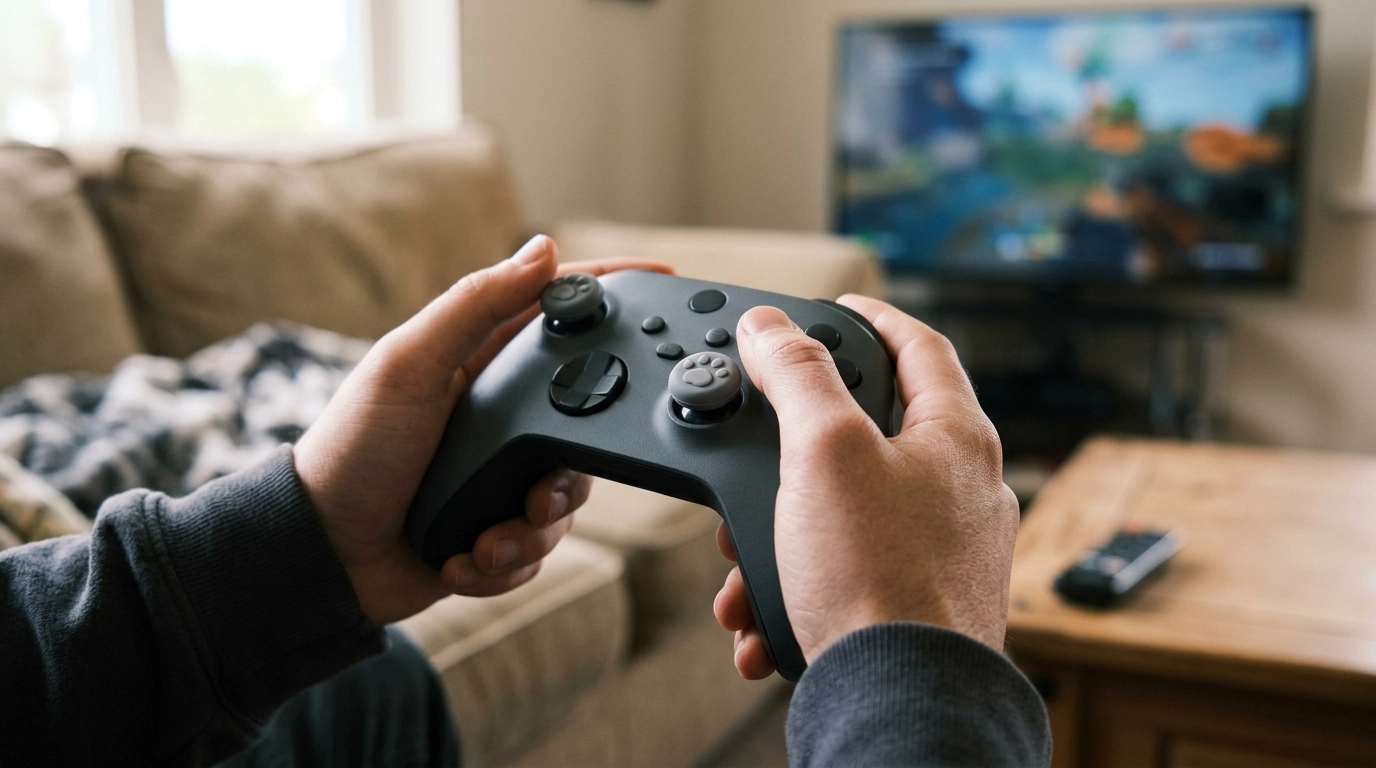
Kitten Thumb Grip Caps for Controllers – Non-Slip Joystick Covers
Small upgrades can change how a controller feels in your hands. Our Kitten Thumb Grip Caps for Controllers – Non-Slip Joystick Covers add a soft, non-slip surface to your analog sticks for steadier aim, smoother movement, and a touch of personality—without changing how your controller works day to day. If you’ve ever felt your thumb slide during a tense fight, a late-game sprint, or a tight corner, grip caps are a simple way to make the stick feel more dependable.
What these kitten thumb grip caps do for your gameplay
- Add traction to the joystick top so your thumbs stay planted during quick turns, sprints, and micro-adjustments.
- Help reduce slip when your hands get warm, sweaty, or dry—useful for longer sessions and faster genres.
- Create a slightly more cushioned feel that can make repeated movements more comfortable over time.
- Make controllers easier to identify at home or at a gaming night—an easy visual cue without permanent changes.
Because grip caps change the surface your thumb touches (not the controller’s electronics), the biggest difference you’ll notice is consistency. That “same feel” from the first match to the last can help you stay calmer and more precise when you’re reacting quickly.
Who they’re best for
- Competitive players who want more consistent thumb control for shooters, battle royale, and sports titles.
- Casual players who want a friendlier grip feel for open-world exploration and co-op nights.
- Handheld and couch gamers who switch posture often and want the stick to feel dependable in any position.
- Anyone sharing controllers—grip caps are a simple way to personalize without adding bulk to the controller body.
If you keep multiple controllers on hand, grip caps can also help you quickly spot “your” controller without labels or tape.
Fit and feel: what to check before putting them on
- Analog stick style: Most caps are designed for standard console-style thumbsticks. After install, the cap should sit flat on the stick top and not rock side-to-side.
- Clearance: Move the stick in full circles and press stick-click (L3/R3) to confirm the cap doesn’t rub the controller shell or bind at the edges.
- Sensitivity preference: Added texture can improve control, but if you prefer a very light touch, you’ll want a grip style that doesn’t feel “sticky.”
- Shared controllers: Consider keeping one controller “stock” and one with grips so everyone can pick the feel they like.
A good install feels boring—in the best way. The stick should move normally in every direction, and clicks should register without extra effort.
Quick install that stays put
- Wash and dry your hands first—skin oils can make the cap harder to seat evenly.
- Wipe the joystick tops with a dry microfiber cloth; if needed, lightly dampen the cloth with water and dry fully before install.
- Stretch the cap over the stick and press around the edges until the rim is evenly seated.
- Test: rotate the stick through the full range and press the stick-click to ensure normal movement.
For general accessory care habits (especially if you swap gear often), Microsoft’s guidance on keeping accessories clean is a helpful baseline: Care for your Xbox console and accessories.
Care and longevity tips
If you’re ordering accessories online, it’s also worth skimming the FTC’s consumer checklist for smart, secure purchases: FTC Consumer Advice: Buying Online.
At-a-glance: stock stick vs. grip cap
| Feature | Stock joystick | With kitten thumb grip caps |
|---|---|---|
| Thumb traction | Depends on stick material and wear | More consistent non-slip contact |
| Comfort on long sessions | Can feel hard or slick over time | Softer feel with added texture |
| Precision for small adjustments | Can be fine but may slip under pressure | Helps stabilize micro-movements |
| Setup time | None | Takes a minute to install and test |
| Personal style | Neutral | Adds a cute, easy-to-spot look |
Pairing ideas from our shop
- For grab-and-go days: If you’re heading to a friend’s place, a tournament meetup, or just bouncing between activities, our team likes keeping essentials together with the Lightweight 3L Cycling Backpack for Running, Hiking & Outdoor Sports. It’s an easy way to keep small items from getting lost in the shuffle.
- For a cleaner home setup: If you’re building a gaming corner you actually want to sit in every day, a small statement piece can make the space feel intentional. The Beige Travertine U-Shape Sculpture – Modern Stone Decor for Home Interiors is a simple upgrade that looks good on a shelf, desk, or media console.
FAQ
Do thumb grip caps affect joystick responsiveness?
No—your controller’s electronics and input signals stay the same. What changes is the feel: added texture and cushioning can help your thumb stay planted, so inputs can feel steadier. After installing, move the stick through the full range and test L3/R3 clicks to ensure nothing rubs.
Will these non-slip joystick covers fit my controller?
They’re designed for standard analog sticks, but fit can vary by stick shape and height. Once installed, the cap should sit evenly, not rock side-to-side, and the stick should move freely in all directions without touching the controller shell.
How do you clean thumb grip caps without damaging them?
Remove them, wash with mild soap and water, rinse, and let them air-dry completely before reinstalling. Avoid harsh cleaners or solvents, and don’t put them back on until they’re fully dry.














Leave a comment