15W Magnetic Wireless Charger Stand for iPhone
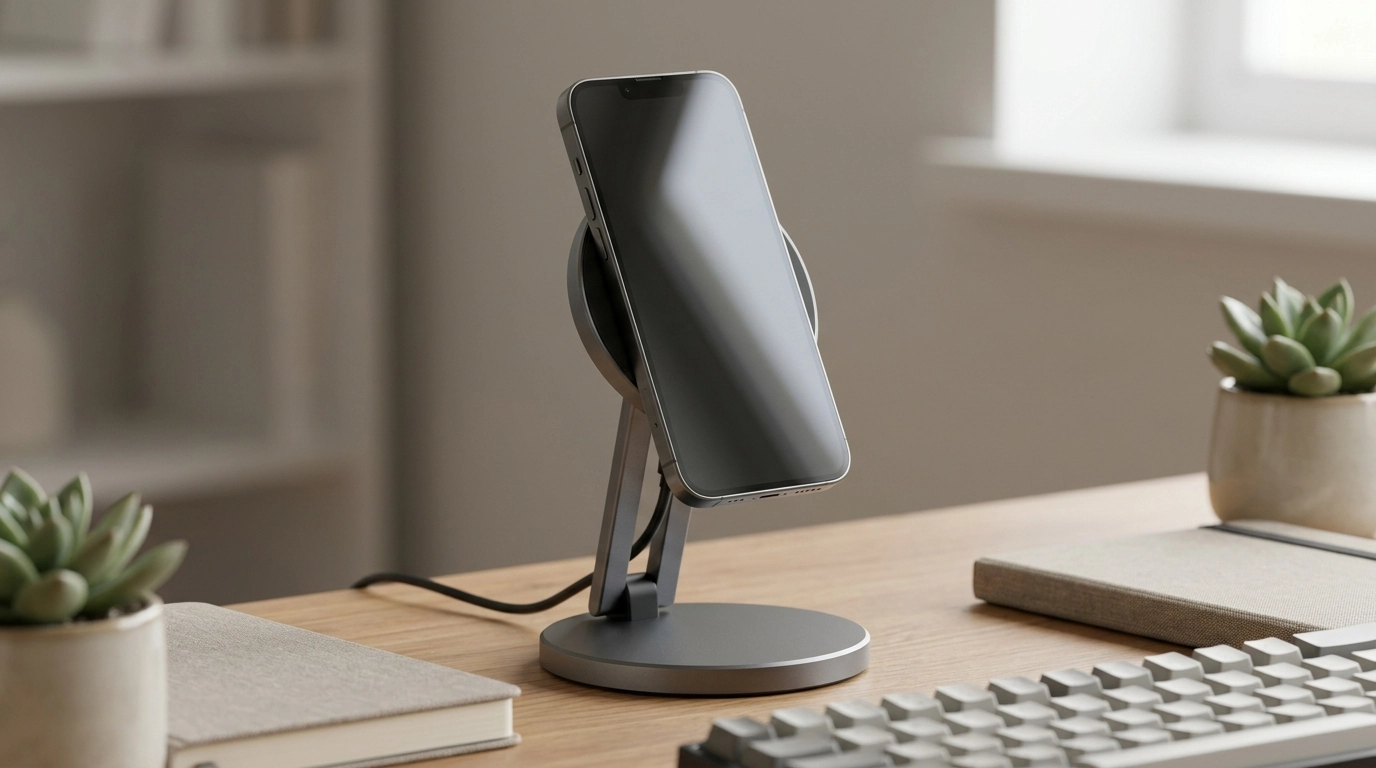
Magnetic Wireless Charger Stand 15W Fast Charging Dock for iPhone
A charging spot should make daily routines easier: set your phone down, get a solid hold, and keep the screen at a comfortable angle for calls, alarms, and quick glances. Our Magnetic Wireless Charger Stand 15W Fast Charging Dock for iPhone is built for a clean desk or nightstand setup, with up to 15W wireless charging for compatible iPhone models and a stable stand form that keeps your screen readable while it powers up.
What this charger stand is made to solve
Wireless charging feels “effortless” only when it’s consistent. Our team designed this stand around the everyday friction points that make people abandon wireless docks.
- Turns charging into a simple drop-and-go habit—no hunting for a cable end every time.
- Magnetic alignment helps your phone land in a consistent position for reliable charging contact.
- Stand-style viewing keeps notifications, time, and incoming calls easy to see at a glance.
- A tidy charging dock reduces cable clutter and creates a dedicated “phone home” on your desk or bedside.
Magnetic alignment + 15W wireless charging: what to expect
This stand supports up to 15W wireless charging when your device and power setup allow it. Real-world results vary based on your phone model, battery temperature, background activity, and the wall adapter you use.
- Up to 15W wireless charging supports faster top-ups for compatible devices and power adapters; actual speed depends on your phone model, settings, and power source.
- Magnetic attachment helps keep your phone centered, which can prevent slow or interrupted charging caused by misalignment.
- Wireless charging works best with slim, compatible cases; thicker or metal-backed cases can reduce performance.
- For the most consistent results, pair the stand with a quality power adapter that can supply adequate wattage to a 15W wireless charger.
Quick setup and performance checklist
| Step | What to do | Why it helps |
|---|---|---|
| 1. Place the stand | Set it on a stable surface (desk/nightstand) with room for the phone to sit centered | Reduces wobble and keeps alignment consistent |
| 2. Use a solid power source | Connect to a reliable wall adapter (higher-wattage adapters typically perform better with fast wireless charging) | Helps the charger sustain higher output when supported |
| 3. Check the case | Try charging with and without the case if charging seems slow | Some materials/thickness can block wireless efficiency |
| 4. Confirm alignment | Let the magnet pull the phone into place; avoid off-center placement | Proper coil alignment improves charging stability |
Designed for the desk: a stand that keeps the screen useful
If your phone lives near your keyboard, a flat charging pad can turn into a “set it down and forget it” surface—until you need a code, a call, or a quick glance. A stand keeps your screen in play while you charge.
- Ideal for work-from-home and office setups—keep your phone visible for 2FA codes, timers, and quick calls.
- Stand viewing angle supports FaceTime-style video calls and speakerphone use while charging.
- A dedicated dock location helps keep earbuds, keys, and other essentials organized—one less item roaming around.
- Works well as a “charging station anchor” when paired with a cable route behind your desk for a cleaner look.
Nightstand routine: steady hold for alarms and wind-down time
At night, charging needs to be predictable. Magnetic placement helps you land in the charging zone even in low light, and the upright screen is easier to read when you check the time.
- Keeps your phone upright and readable—useful for alarms, bedtime playlists, and do-not-disturb checks.
- Magnetic placement reduces the chance of placing the phone slightly off the charging zone in low light.
- Helps maintain a consistent nightly charging habit—dock it the same way every time.
- Tip: If your phone warms during charging, allow airflow around it and avoid covering it with fabric or papers.
Compatibility notes that prevent frustration
Common situations and quick fixes
| Situation | Likely cause | Try this |
|---|---|---|
| Charging feels slow | Power source limited or phone is running hot | Use a higher-quality adapter; let the phone cool; lower screen brightness |
| Charging stops intermittently | Off-center placement or case interference | Remove the case to test; re-seat the phone so magnets center it |
| Phone doesn’t “snap” into place | Non-magnetic case or phone model | Use a magnetic-compatible case or charge without the case if possible |
| Stand shifts on the desk | Smooth surface + frequent taps | Place on a more stable surface; keep cable tension low |
Keeping wireless charging safe and consistent
For deeper background on wireless standards and iPhone magnetic alignment, you can review the Wireless Power Consortium (Qi standard) and Apple Support: About MagSafe on iPhone.
A clean upgrade for everyday charging
In-stock picks from our store
- Magnetic Wireless Charger Stand 15W Fast Charging Dock for iPhone
- Lightweight 3L Cycling Backpack for Running, Hiking & Outdoor Sports
- Beige Travertine U-Shape Sculpture – Modern Stone Decor for Home Interiors
FAQ
Will this charge through a phone case?
It can charge through many slim cases, but thicker cases, metal-backed cases, or cases with attachments can reduce efficiency and weaken magnetic alignment. If charging feels inconsistent, try it briefly with the case off to pinpoint the cause.
Do you need a special power adapter to get 15W charging?
You’ll get the best chance at higher wireless output when you use a quality wall adapter that can supply sufficient power, and when your iPhone model supports faster wireless charging. If the power source is limited, the charger may still work but at a lower effective speed.
Why does wireless charging sometimes feel slower than a cable?
Wireless charging can slow down due to heat management, heavy phone usage while charging, imperfect alignment, and battery optimization features. Re-centering the phone, lowering screen brightness, and letting the device cool can improve consistency.














Leave a comment