High-Back Mesh Office Chair with Flip-Up Arms Guide
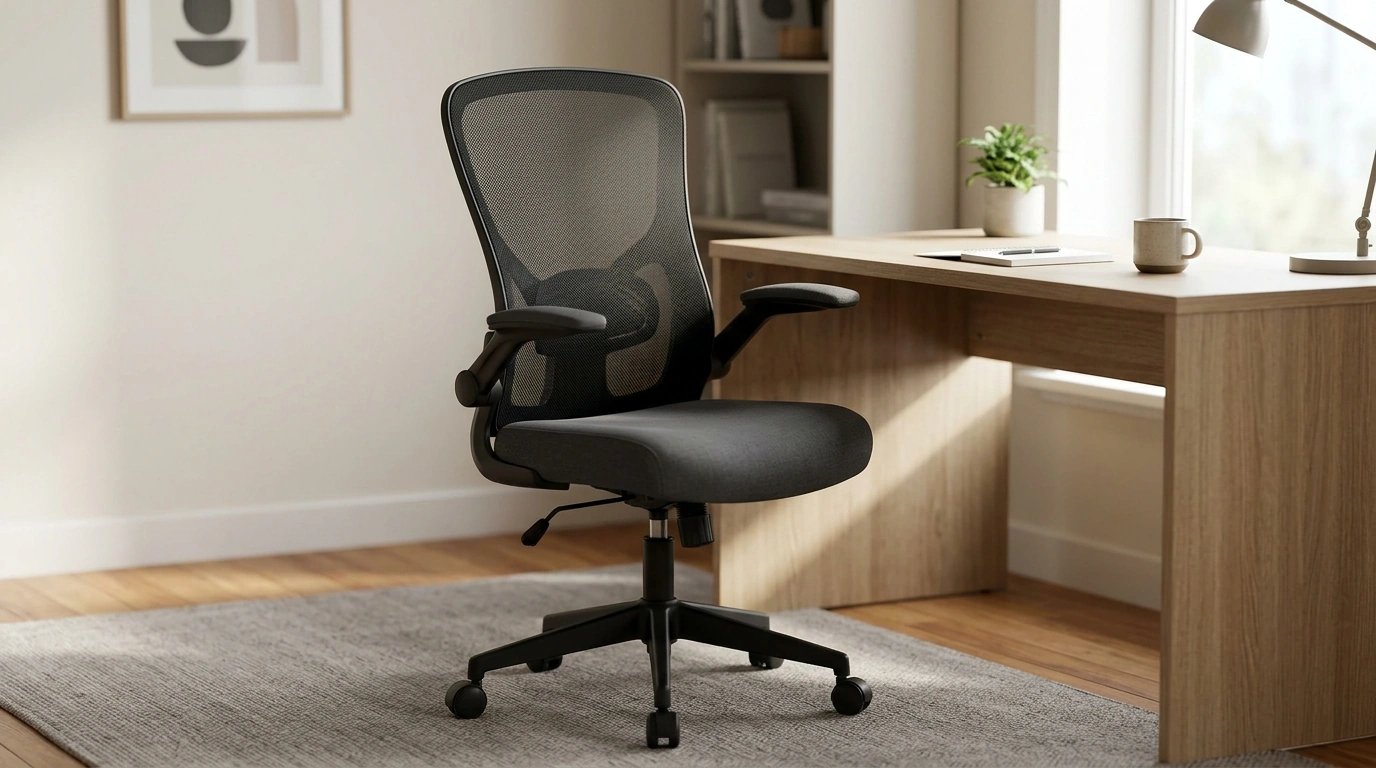
Ergonomic High Back Office Chair with Mesh Lumbar Support and Flip-Up Arms
Long desk sessions tend to expose the weak links in a workspace—poor lumbar support, heat buildup from solid backs, and armrests that get in the way when pulling close to the desk. A high-back chair with breathable mesh support and flip-up arms is designed to keep the spine better aligned, reduce pressure on the lower back, and adapt quickly between focused work, meetings, and compact home-office setups.
What makes a high-back mesh chair feel supportive
Support isn’t just about “more padding.” For many setups, the best everyday comfort comes from a chair that guides posture gently, stays cool through long blocks of work, and moves out of the way when you need closer desk access.
- High-back profile: A taller backrest helps support the mid and upper back and can encourage a more upright posture during typing, video calls, and reading.
- Mesh lumbar zone: A breathable mesh area is meant to maintain the natural curve of the lower spine while allowing airflow to reduce that “stuck to the chair” feeling.
- Waterfall-style seat edge: Common on ergonomic task chairs, a rounded front edge can help reduce pressure behind the knees, especially when sitting for extended periods.
- Flip-up arms: Arms that lift out of the way create clearance for cross-legged breaks, instrument practice, or sliding the chair fully under a desk.
Key features to look for in daily use
The most practical features are the ones you notice every hour: how your lower back feels, whether you overheat, and how easily the chair fits under a desk or into a shared room.
| Feature | Why it matters | What to check at setup |
|---|---|---|
| Mesh lumbar support | Helps maintain lower-back curve and airflow | Lower back feels supported when sitting upright |
| High backrest | Supports mid/upper back during longer sessions | Shoulder blades are not forced forward |
| Flip-up armrests | Creates space and improves desk clearance | Arms can lift and stay out of the way securely |
| Seat height adjustment | Aligns elbows with desk and feet with floor | Feet flat; knees around 90 degrees |
| Tilt/rock function | Encourages micro-movement and reduces stiffness | Recline feels controlled, not sudden |
How to set it up for better posture
- Set seat height first: Adjust until your feet rest flat and your thighs are roughly parallel to the floor. If your desk is high, use a footrest rather than raising the chair so far that your legs dangle.
- Sit all the way back: Let the lumbar area meet the curve of your lower back; avoid perching on the front edge, which encourages slouching.
- Use arms strategically: Keep armrests down when they help you relax your shoulders and support your forearms; flip them up if they force your elbows outward or block you from pulling in close.
- Choose a slight recline: For reading and calls, a mild recline can reduce spinal compression. Return to a more upright angle when you need typing precision.
- Match the rest of your workstation: Keep the keyboard close enough to avoid reaching, and place the top of the monitor near eye level. For additional guidance, see OSHA’s computer workstation recommendations and the Mayo Clinic office ergonomics guide.
When flip-up arms are especially useful
Care, maintenance, and longevity tips
- Mesh care: Vacuum gently and spot-clean with mild soap. Avoid harsh solvents that may weaken fibers over time.
- Caster maintenance: Remove hair and debris periodically so the chair rolls smoothly and doesn’t drag across the floor.
- Fastener check: Tighten screws after the first week of use and then monthly if the chair sees heavy daily hours.
- Floor protection: Use a chair mat on soft or delicate surfaces to reduce rolling resistance and strain on the base.
- Posture breaks: Even the best chair benefits from brief standing or walking breaks about every hour; consistent movement is a key part of preventing stiffness (see NIOSH ergonomics resources).
Who this chair tends to suit best
Product at a glance
- Name: Ergonomic High Back Office Chair with Mesh Lumbar Support and Flip-Up Arms
- Price: $79.51 USD
- Availability: In stock
- Best for: everyday desk work, breathable back support, flexible arm positioning
- Primary highlights: high-back support, mesh lumbar zone, flip-up arms for desk clearance
More in-stock picks for a functional workspace
- Beige Travertine U-Shape Sculpture – Modern Stone Decor for Home Interiors (a simple way to make a desk or shelf look finished without adding clutter)
- Lightweight 3L Cycling Backpack for Running, Hiking & Outdoor Sports (handy for commuting essentials when you work between locations)
FAQ
Are flip-up armrests comfortable for long typing sessions?
They can be, as long as your shoulders stay relaxed and your elbows rest lightly without pushing your arms outward. Many people keep the arms down for support while typing and flip them up when they interfere with desk height or close-in positioning.
Does mesh lumbar support feel firm or soft?
Mesh lumbar support typically feels springy and responsive rather than plush. It should keep consistent contact with the lower back without feeling like it’s pushing aggressively into your spine.
How should the chair be adjusted to reduce lower-back discomfort?
Start by setting seat height so your feet are flat and knees are around 90 degrees, then sit back so your lower back meets the lumbar area. A slight recline can reduce pressure, and proper monitor/keyboard placement helps prevent slouching that can aggravate discomfort.













Leave a comment