Powered Height-Adjustable AV Cart: Clean Cables, Easy Moves
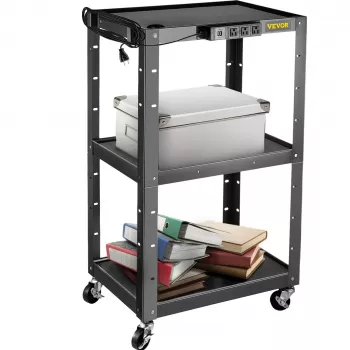
Height Adjustable AV Cart with Power Strip & Cord Management
A height-adjustable AV cart can turn almost any room into a flexible presentation space by keeping screens, laptops, and accessories mobile, organized, and powered. With a built-in power strip and cord management, your setup stays cleaner and safer while moving between classrooms, meeting rooms, or training areas—so it’s easier to roll in, plug in, and get started without cable chaos.
What This AV Cart Is Built to Do
- Supports mobile AV setups for presentations, training sessions, and equipment staging.
- Adjusts working height to suit standing speakers, seated use, or varied audience sightlines.
- Provides onboard power access through an integrated power strip for fewer wall-hunts and adapter clutter.
- Keeps cables routed with cord management to reduce snags, tangles, and trip hazards.
- Rolls between rooms to minimize downtime when switching spaces or schedules.
Height Adjustment: Comfort, Visibility, and Control
Height adjustment is more than a convenience—it’s a practical way to improve visibility and control across different rooms and presenters. A wider height range helps match projector throw heights, monitor viewing angles, and speaker comfort, especially when a cart is shared across teams or classrooms.
- A wider height range can help align the screen to the audience and keep controls within easy reach.
- Better positioning can reduce neck and shoulder strain during longer sessions by bringing screens and input devices closer to a comfortable working height.
- In shared environments, adjustable height makes it easier for different presenters to use their preferred device setups without reconfiguring the whole station.
- Before purchase, confirm the minimum and maximum heights fit the intended equipment and the room layout (including sightlines over seated attendees).
For general guidance on reducing strain in work and presentation setups, refer to NIOSH ergonomics resources.
Power Strip + Cord Management: Cleaner Setups and Safer Movement
Built-in power helps keep essential devices connected without searching for a wall outlet in every room. Cord management keeps cables routed along the cart, preventing dragging cords that can snag on chair legs, door thresholds, or caster wheels. Cleaner routing also reduces the odds of accidental unplugging when you reposition the cart mid-session.
- Onboard power strip can keep common devices plugged in: laptop charger, small monitor, audio receiver, document camera, or streaming box.
- Cord routing helps prevent cables from dragging on the floor when the cart moves.
- A cleaner cable path reduces accidental unplugging during repositioning.
- Bundle longer cables with reusable ties and leave a small service loop near devices that need tilt or repositioning.
Common Devices and Practical Cable Routing Tips
| Device | Power needs | Cord management tip |
|---|---|---|
| Laptop + charger | Standard AC adapter | Route the adapter cable along the cart frame; keep a small loop near the laptop shelf for repositioning. |
| Monitor or small TV | AC power + video cable | Secure video cable separately from power to reduce strain; avoid tight bends at the input port. |
| Powered speakers | AC power (and audio input) | Keep audio cable away from AC lines where possible; use short patch cables on the cart. |
| Document camera / webcam hub | USB power or AC | Use a short USB cable to a hub mounted on the cart; secure the hub to reduce dangling connections. |
| Network/streaming device | Low power AC/USB | Mount device near the power strip and label the plug to speed up tear-down and re-setup. |
Trip hazards are a real concern anywhere people walk around a live setup. For basics on preventing slips, trips, and falls, see OSHA’s walking-working surfaces guidance.
Mobility and Stability in Real Rooms
The best mobile cart is the one that rolls smoothly and stays steady when someone taps a touchscreen, plugs in a cable, or adjusts equipment. Caster quality plays a major role in both ease of movement and overall stability.
- Caster quality affects both ease of rolling and how steady equipment feels while in use.
- Locking wheels help keep the cart in place during touch interactions (typing, plugging in, adjusting controls).
- Balance matters: place heavier items on lower shelves when possible to reduce tip risk.
- Check doorway widths and elevator clearance if the cart will travel across floors.
Use Cases: Where a Powered, Adjustable Cart Fits Best
Setup and Everyday Maintenance
Product Options In Stock
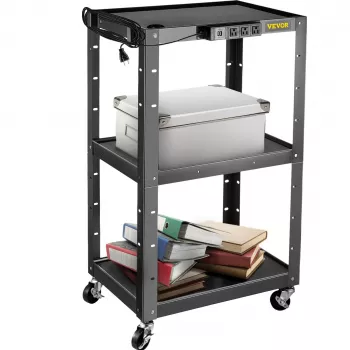
- Height Adjustable AV Cart with Power Strip & Cord Management ($105.17): a mobile workstation designed to keep devices powered while helping reduce cable clutter. Best for multi-room setups where fast deployment and tidy cable routing matter—compare shelf space and height range to your monitor/laptop footprint.
- Lightweight 3L Cycling Backpack for Running, Hiking & Outdoor Sports ($38.67): a compact option for carrying small presentation add-ons—like adapters, a wireless mic pack, or spare cables—so the cart can stay streamlined.
- Beige Travertine U-Shape Sculpture – Modern Stone Decor for Home Interiors ($100.01): a simple way to elevate the look of a reception desk or conference area when the cart is part of a client-facing space.
FAQ
What devices can be plugged into the built-in power strip on an AV cart?
Most setups use it for laptop chargers, monitors/small TVs, powered speakers, and small AV accessories like document cameras or streaming devices. Always check the power strip’s rated load and avoid plugging in high-wattage appliances that could exceed its capacity.
How can cords be kept from snagging when rolling the cart between rooms?
Route cables along the cart frame, secure them with reusable ties or Velcro, and keep cords off the floor with proper routing points. Leave small service loops near devices that move or tilt, and lock casters while connecting or disconnecting cables.
How do you choose a safe height and load setup for a rolling AV cart?
Keep heavier gear on lower shelves, stay within the cart’s stated weight limits, and avoid a top-heavy arrangement—especially at maximum height. Lock the wheels during use so the cart doesn’t shift while someone types, taps a screen, or adjusts equipment.














Leave a comment