Adjustable Armrest Gaming Chair: Lumbar Support Guide
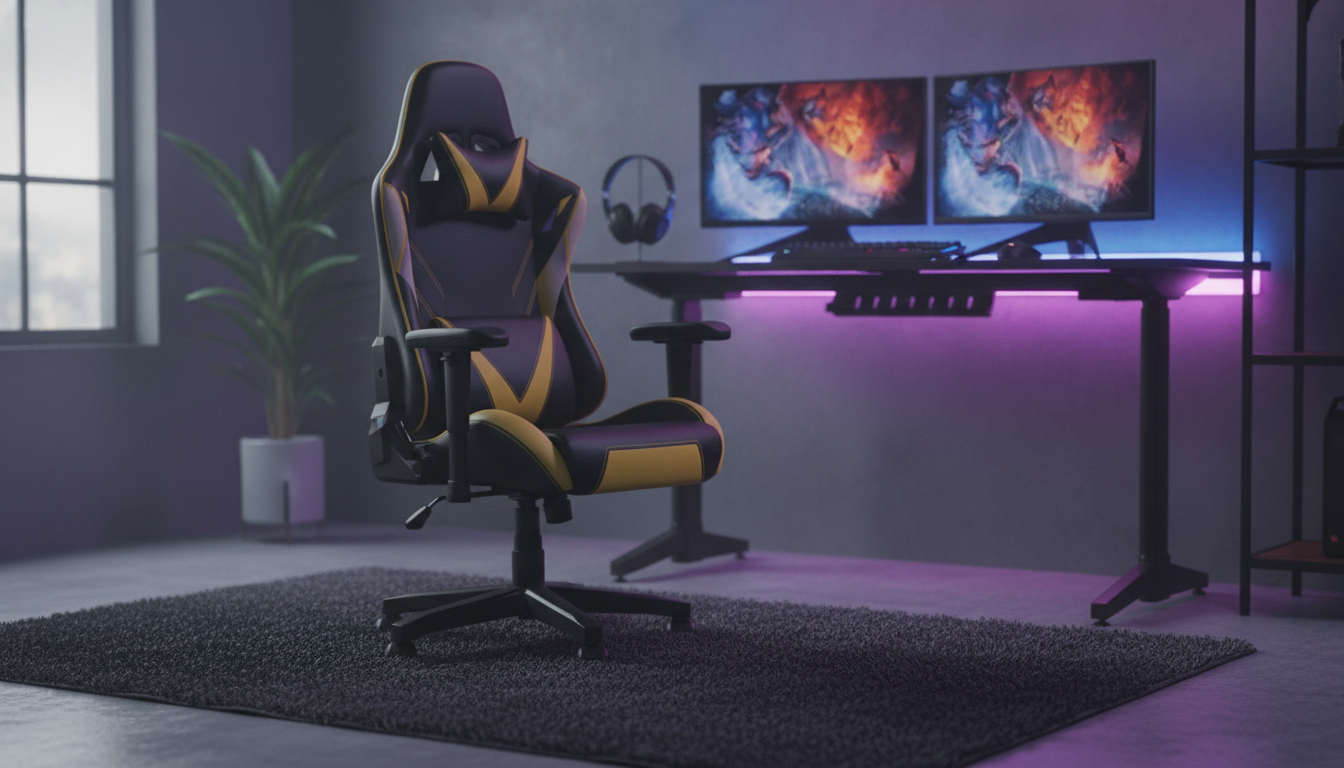
Ergonomic Gaming Chair with Adjustable Armrest and Lumbar Support
Long sessions at a desk can punish the lower back, shoulders, and wrists. A chair that combines supportive lumbar contouring with adjustable armrests helps align the spine, reduce shoulder tension, and keep hands positioned comfortably for keyboard, mouse, or controller use. When the seat height, armrests, and lumbar contact work together, posture feels more natural—so it’s easier to stay focused on the game, the work, or the next creative task.
What Makes a Chair Feel Supportive During Long Sessions
“Supportive” isn’t just about being soft or firm. It’s about where the chair meets your body and how well it keeps you balanced over time.
- Lumbar support that matches the natural inward curve of the lower back to discourage slumping.
- Armrests that adjust to meet the forearms, reducing shoulder hike and wrist bend.
- A backrest shape that encourages an upright posture without forcing a rigid position.
- Seat padding that distributes pressure across thighs and hips to reduce numbness over time.
- Stable base and smooth rolling to keep movement controlled when repositioning.
Ergonomic guidance commonly emphasizes neutral posture, supported arms, and a workstation setup that prevents reaching—principles echoed by resources like the NIOSH Computer Workstations guidance and the Mayo Clinic office ergonomics guide.
Adjustable Armrests: How to Set Them Up
Armrests are more than a comfort feature—they’re a positioning tool. Dialed in correctly, they help take load off the upper traps (the “shrug” muscles) and keep wrists from angling into awkward bends.
- Set armrest height so elbows rest lightly at about a right angle, keeping shoulders relaxed.
- Adjust armrests inward/outward (if available) so forearms are supported without pushing elbows away from the body.
- Position armrests so wrists stay neutral while using mouse/keyboard—avoid bending upward or outward.
- Leave a small gap between armrest and desk edge to prevent contact pressure on forearms.
- Re-check settings after changing seat height; armrest and seat height work together.
Quick Setup Checklist
| Adjustment | Goal | Simple test |
|---|---|---|
| Seat height | Feet flat; thighs roughly parallel | Knees at or slightly below hip level |
| Armrest height | Relax shoulders; support forearms | Shoulders not raised; elbows near 90° |
| Armrest position | Neutral wrists and straight forearms | No wrist bend while mousing/typing |
| Backrest angle | Balanced upright comfort | Able to sit tall without bracing core constantly |
| Lumbar placement | Support the low-back curve | No pressure point; reduced slouching urge |
Lumbar Support: Comfort Without Pressure Points
Great lumbar support feels like the chair is “meeting you” at the belt line—filling in space that would otherwise collapse into a rounded posture.
- Aim for lumbar contact at belt-line height to support the natural curve rather than the mid-back.
- If support feels too strong, slightly change backrest angle or seat depth (when available) before removing support entirely.
- Avoid a gap between lower back and chair; gaps often lead to sliding forward and slumping.
- Support should feel like gentle “fill” rather than a hard push; pressure points can cause fatigue.
- Pair lumbar support with a relaxed ribcage position—overarching can be as uncomfortable as slouching.
A quick self-check: sit back, take a normal breath, and notice whether your lower back feels supported without you needing to “hold” posture. If you’re constantly bracing, adjust the chair before assuming you need a different model.
Key Specs to Compare Before Buying
Gaming chairs can look similar at a glance, but the right specs make day-to-day comfort easier to maintain.
- Adjustability range: seat height, back tilt/recline, armrest adjustments, and lumbar positioning.
- Materials: breathable upholstery for heat management; durable padding for long-term shape retention.
- Frame and base: sturdy construction, reliable casters for your flooring type, and a stable footprint.
- Fit: seat width and backrest height that match body size; too wide can reduce arm support, too narrow can feel restrictive.
- Maintenance: wipe-clean surfaces and stitching quality for longevity.
For many setups, the most important “spec” is how easily you can repeat a good posture day after day. Smooth, intuitive adjustments tend to get used; fussy ones get ignored.
Who Benefits Most From This Type of Chair
Care, Placement, and Everyday Comfort Tips
Product Spotlight
Ergonomic Gaming Chair with Adjustable Armrest and Lumbar Support is built for posture-friendly comfort by pairing low-back contouring with arm positioning that can better match desk and device height. It’s a strong choice for anyone who wants support that feels “set-and-forget” once adjustments are dialed in.
More in-stock picks to complement a better desk routine
- Timberland Men’s Brown Leather Boots — supportive footwear can make quick stand-up breaks more comfortable, especially if you’re moving between rooms or working on harder floors.
- Zen-Savvy Savings Checklist: The Japanese Way to Build Wealth with Calm and Clarity | Minimalist Budgeting Guide | Japanese Way to Save Money — a simple way to plan upgrades over time, from chair and desk changes to lighting and peripherals.
FAQ
How should adjustable armrests be positioned for gaming?
Set armrests so your elbows rest near a 90° angle with shoulders relaxed. Keep forearms supported without pushing elbows outward, and aim for neutral wrists on mouse/keyboard or while holding a controller.
Is lumbar support supposed to feel firm?
It should feel like gentle support filling the low-back curve, not a sharp push. If it feels aggressive, try a small backrest angle change or reposition the lumbar contact before removing support.
What desk height works best with an ergonomic gaming chair?
A good target is a desk surface roughly level with your elbows when seated, so you don’t have to raise your shoulders or bend your wrists to use the keyboard and mouse.














Leave a comment